
Extension Service Development
Extension Service Development
Overview
Extension service applicable scenarios: Small and medium-sized Web applications that need to be developed based on MapGIS traditional kernel API.
Not applicable scenarios: Not suitable for large-scale application construction (large-scale applications use standalone services or microservices for construction), because its capabilities are limited by the plugin mechanism and do not support large frameworks such as SpringBoot.
Extension services are hosted in IGServer server in the form of plugins, loaded into IGServer's JVM process with their own independent ClassLoader, avoiding Java class conflicts, ensuring that classes between plugins and IGServer framework do not pollute each other, while also ensuring the security of each sub-module.
Independent ClassLoader is very important because there are many third-party dependencies in the Java ecosystem, and dependency version conflicts are very common. It often happens that plugins and frameworks have common dependencies. Through independent ClassLoader, the compatibility between plugins and frameworks is solved.
Dependencies
If dependencies already exist in the igserver-webapp package, set them to <scope>provided</scope> in the plugin, because the plugin can share dependencies already existing in the framework. If duplicate dependencies are added to the plugin, it will only increase the size of the plugin.
Note that if a dependency in the plugin and framework dependency exist simultaneously with inconsistent versions, you need to add its dependency in the plugin to ensure the plugin runs normally. If both the plugin and framework have a dependency, the plugin dependency takes priority, similar to webapp in Tomcat, so that class conflicts do not occur.
Special dependencies: The plugin framework's own dependencies must use the igs framework, and must set <scope>provided</scope> in the plugin, otherwise the plugin cannot be loaded. The plugin framework's own dependencies include org.pf4j:pf4j, org.pf4j:pf4j-spring, org.springframework:spring-webmvc, io.swagger.core.v3:swagger-annotations, jakarta.servlet:jakarta.servlet-api, org.slf4j:slf4j-api.
Platform kernel middleware dependencies must use the framework's, and must set <scope>provided</scope> in the plugin, otherwise the plugin cannot be loaded.
Dependency Declaration
The plugin must have the following dependencies:
  <dependencies>
     <!--Plugin main framework-->
     <dependency>
         <groupId>org.pf4j</groupId>
         <artifactId>pf4j</artifactId>
         <!-- Must match the IGS framework dependency version, if you can connect to the internal private repository and import mapgis-igs through dependency management, no version is required -->
         <version>X.X.X</version>
         <scope>provided</scope>
     </dependency>
     <dependency>
         <groupId>org.pf4j</groupId>
         <artifactId>pf4j-spring</artifactId>
         <!-- Must match the IGS framework dependency version -->
         <version>X.X.X</version>
         <scope>provided</scope>
     </dependency>
     <!--igserver extension interface-->
     <dependency>
         <groupId>com.zondy.mapgis.igs</groupId>
         <artifactId>mapgis-igs-api</artifactId>
         <!--Must match the IGS framework dependency version-->
         <version>10.6.X.X</version>
         <scope>provided</scope>
     </dependency>
     <!--springmvc standard-->
     <dependency>
         <groupId>org.springframework</groupId>
         <artifactId>spring-webmvc</artifactId>
         <!-- Must match the IGS framework dependency version -->
         <version>X.X.X</version>
         <scope>provided</scope>
     <!--open api3 standard-->
     </dependency>
          <dependency>
            <groupId>io.swagger.core.v3</groupId>
            <artifactId>swagger-annotations</artifactId>
            <!-- Must match the IGS framework dependency version -->
            <version>X.X.X</version>
            <scope>provided</scope>
        </dependency>
     <!--java servlet standard-->
     <dependency>
         <groupId>jakarta.servlet</groupId>
         <artifactId>jakarta.servlet-api</artifactId>
         <!-- Must match the IGS framework dependency version -->
         <version>X.X.X</version>
         <scope>provided</scope>
     </dependency>
     <!--Recommended logging framework-->
     <dependency>
         <groupId>org.slf4j</groupId>
         <artifactId>slf4j-api</artifactId>
         <!-- Must match the IGS framework dependency version -->
         <version>X.X.X</version>
         <scope>provided</scope>
     </dependency>
      <!--Platform middleware dependencies, optional, add if needed-->
     <dependency>
          <groupId>com.zondy.mapgis</groupId>
          <artifactId>mapgis_geoanalysis</artifactId>
          <version>1.0.0</version>
          <scope>provided</scope>
     </dependency>
     <dependency>
         <groupId>com.zondy.mapgis</groupId>
         <artifactId>mapgis_geomap</artifactId>
         <version>1.0.0</version>
         <scope>provided</scope>
      </dependency>
      <dependency>
          <groupId>com.zondy.mapgis</groupId>
          <artifactId>mapgis_geoobjects</artifactId>
          <version>1.0.0</version>
          <scope>provided</scope>
      </dependency>
      <dependency>
          <groupId>com.zondy.mapgis</groupId>
          <artifactId>mapgis_geodatabase</artifactId>
          <version>1.0.0</version>
          <scope>provided</scope>
      </dependency>
  </dependencies>
Environment Without Private Maven Repository
All third-party dependencies of igserver framework can be opened using compression tool on igserver-webapp-*.jar, as shown below.
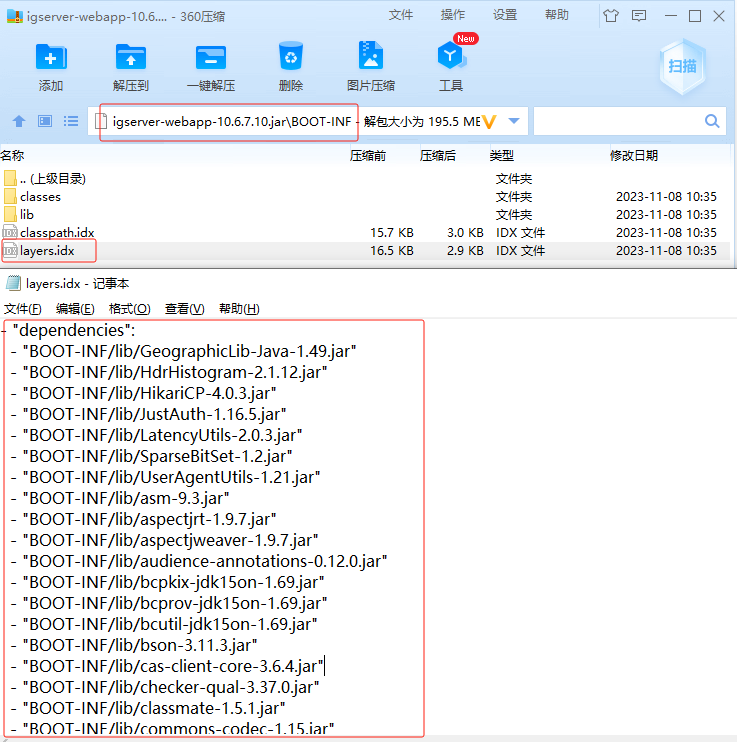
In the compressed package, the BOOT-INF/layers.idx file records all third-party dependency jar packages under the dependencies node, and the application node records internal dependencies.
The lib folder contains all dependency jars. You need to extract and obtain dependency jars, and manually install dependencies.
Install mapgis-igs-api-10.x.x.x.jar, note to modify groupId, artifactId, version to match plugin dependencies:
@REM Note to modify ${dir}, version parameter values and jar package filename
mvn install:install-file -DgroupId=com.zondy.mapgis.igs -DartifactId=mapgis-igs-api -Dversion=10.x.x.x -Dpackaging=jar -Dfile=${dir}/mapgis-igs-api-10.x.x.x.jar
If you need to develop MapGIS kernel related functions, you need to install platform middleware jar packages mapgis_geomap-1.0.0.jar, mapgis_geoobjects-1.0.0.jar, mapgis_geodatabase-1.0.0.jar, mapgis_geoanalysis-1.0.0.jar, note to modify groupId, artifactId, version to match plugin dependencies:
@REM Note to modify ${dir}
mvn install:install-file -DgroupId=com.zondy.mapgis -DartifactId=mapgis_geomap -Dversion=1.0.0 -Dpackaging=jar -Dfile=${dir}/mapgis_geomap-1.0.0.jar
mvn install:install-file -DgroupId=com.zondy.mapgis -DartifactId=mapgis_geoobjects -Dversion=1.0.0 -Dpackaging=jar -Dfile=${dir}/mapgis_geoobjects-1.0.0.jar
mvn install:install-file -DgroupId=com.zondy.mapgis -DartifactId=mapgis_geodatabase -Dversion=1.0.0 -Dpackaging=jar -Dfile=${dir}/mapgis_geodatabase-1.0.0.jar
mvn install:install-file -DgroupId=com.zondy.mapgis -DartifactId=mapgis_geoanalysis -Dversion=1.0.0 -Dpackaging=jar -Dfile=${dir}/mapgis_geoanalysis-1.0.0.jar
Using Private Maven Repository
The internal network maven repository address is http://192.168.176.10:8081/nexus, available for R&D center internal network. Add repository in pom:
    <repositories>
        <repository>
            <id>igs</id>
            <url>http://192.168.176.10:8081/nexus/repository/maven-releases/</url>
            <releases>
                <enabled>true</enabled>
            </releases>
            <snapshots>
                <enabled>true</enabled>
            </snapshots>
        </repository>
     </repositories>
Extension plugin projects can manage igs dependencies through com.zondy.mapgis:mapgis-igs:${igserver.version}. Add the following in the project:
    <dependencyManagement>
        <dependencies>
            <dependency>
                <groupId>com.zondy.mapgis</groupId>
                <artifactId>mapgis-igs</artifactId>
                <version>${igserver.version}</version>
                <type>pom</type>
                <scope>import</scope>
            </dependency>
         </dependencies>
    </dependencyManagement>
At this point, igs dependencies in the plugin do not need to specify version numbers.
Packaging
Package as jar (one-jar)
It is recommended to use maven-assembly-plugin to package plugins as one-jar, as follows:
  <plugin>
      <groupId>org.apache.maven.plugins</groupId>
      <artifactId>maven-assembly-plugin</artifactId>
      <version>3.1.0</version>
      <configuration>
          <descriptorRefs>
              <descriptorRef>jar-with-dependencies</descriptorRef>
          </descriptorRefs>
          <finalName>${project.artifactId}-plugin</finalName>
          <appendAssemblyId>false</appendAssemblyId>
          <attach>false</attach>
          <archive>
              <manifest>
                  <addDefaultImplementationEntries>true</addDefaultImplementationEntries>
                  <addDefaultSpecificationEntries>true</addDefaultSpecificationEntries>
              </manifest>
              <manifestEntries>
                  <Plugin-Id>${plugin.id}</Plugin-Id>
                  <Plugin-Version>${plugin.version}</Plugin-Version>
                  <Plugin-Provider>${plugin.provider}</Plugin-Provider>
                  <Plugin-Class>${plugin.class}</Plugin-Class>
                  <Plugin-Dependencies>${plugin.dependencies}</Plugin-Dependencies>
              </manifestEntries>
          </archive>
      </configuration>
      <executions>
          <execution>
              <id>make-assembly</id>
              <phase>package</phase>
              <goals>
                  <goal>single</goal>
              </goals>
          </execution>
      </executions>
  </plugin>
Package as zip
Plugins also support packaging as zip format. The notable difference is that plugin dependency jars are placed intact in the lib folder. Zip format plugin packages are automatically extracted to the same level directory at runtime.
<build>
    <plugins>
        <plugin>
            <groupId>org.apache.maven.plugins</groupId>
            <artifactId>maven-jar-plugin</artifactId>
            <configuration>
                <archive>
                    <manifestEntries>
                        <Plugin-Id>${plugin.id}</Plugin-Id>
                        <Plugin-Class>${plugin.class}</Plugin-Class>
                        <Plugin-Version>${plugin.version}</Plugin-Version>
                        <Plugin-Provider>${plugin.provider}</Plugin-Provider>
                        <Plugin-Dependencies>${plugin.dependencies}</Plugin-Dependencies>
                    </manifestEntries>
                </archive>
            </configuration>
        </plugin>

        <plugin>
            <groupId>org.apache.maven.plugins</groupId>
            <artifactId>maven-antrun-plugin</artifactId>
            <executions>
                <execution>
                    <id>unzip jar file</id>
                    <phase>package</phase>
                    <configuration>
                        <target>
                            <unzip src="target/${project.artifactId}-${project.version}.${project.packaging}"
                                    dest="target/plugin-classes"/>
                        </target>
                    </configuration>
                    <goals>
                        <goal>run</goal>
                    </goals>
                </execution>
            </executions>
        </plugin>

        <plugin>
            <artifactId>maven-assembly-plugin</artifactId>
            <configuration>
                <descriptors>
                    <descriptor>
                        src/main/assembly/assembly.xml
                    </descriptor>
                </descriptors>
                <appendAssemblyId>false</appendAssemblyId>
            </configuration>
            <executions>
                <execution>
                    <id>make-assembly</id>
                    <phase>package</phase>
                    <goals>
                        <goal>single</goal>
                    </goals>
                </execution>
            </executions>
        </plugin>

        <plugin>
            <artifactId>maven-deploy-plugin</artifactId>
            <configuration>
                <skip>true</skip>
            </configuration>
        </plugin>
    </plugins>
</build>
Add assembly.xml in src/main/assembly with the following content:
<assembly>
    <id>plugin</id>
    <formats>
        <format>zip</format>
    </formats>
    <includeBaseDirectory>false</includeBaseDirectory>
    <dependencySets>
        <dependencySet>
            <useProjectArtifact>false</useProjectArtifact>
            <scope>runtime</scope>
            <outputDirectory>lib</outputDirectory>
            <includes>
                <include>*:jar:*</include>
            </includes>
        </dependencySet>
    </dependencySets>
    <fileSets>
        <fileSet>
            <directory>target/plugin-classes</directory>
            <outputDirectory>classes</outputDirectory>
        </fileSet>
    </fileSets>
</assembly>
The packaged zip includes classes folder and lib folder.
Plugin Properties
Plugin properties must be specified. Note that plugin id must be unique. Class is the Plugin implementation class. If it is an extended SpringMvc REST service, the service will add /igs/rest/services/{plugin-id}/ExtensionServer when hosted in IGServer. Example:
 <properties>
     <!-- Override below properties in each plugin's pom.xml -->
     <!-- Plugin implementation must include the following configuration items-->
     <plugin.id>igs-demo-plugin</plugin.id>
     <plugin.class>com.zondy.mapgis.igs.plugins.demo.DemoPlugin</plugin.class>
     <plugin.version>0.0.1</plugin.version>
     <plugin.provider>MapGIS</plugin.provider>
     <plugin.dependencies/>
 </properties>
Execute in the plugin project directory:
mvn clean packageThe plugin file mvc-service-extension-demo-plugin.jar will be generated in the target directory.
For source code debugging, create plugin.properties in the plugin module directory, example:
 plugin.id=igs-demo-plugin
 plugin.class=com.example.plugins.server.DemoPlugin
 plugin.version=0.0.1
 plugin.provider=MapGIS
 plugin.dependencies=
If multiple plugins have dependencies on each other, declare plugin dependencies through the plugin.dependencies property. For specific dependency declaration syntax, refer to pf4j plugins
Development
Create a plugin class, which is the plugin.class mentioned above, example:
@Slf4j
public class DemoPlugin extends SpringPlugin implements FrameworkContextCapable {

    public DemoPlugin(PluginWrapper wrapper) {
        super(wrapper);
    }

    @Override
    public void start() {
        log.info("DemoPlugin.start,mode:{}", wrapper.getRuntimeMode());
    }

    @Override
    public void stop() {
        log.info("DemoPlugin.stop()");
    }

    @Override
    protected ApplicationContext createApplicationContext() {
        //Create plugin's own IOC container here
        AnnotationConfigApplicationContext applicationContext = new AnnotationConfigApplicationContext();
        applicationContext.setClassLoader(getWrapper().getPluginClassLoader());
        applicationContext.register(SpringConfiguration.class);
        applicationContext.refresh();
        return applicationContext;
    }

    @Override
    public void setFrameworkApplicationContext(ApplicationContext applicationContext) {
        //Get the framework's IOC container here
        log.info("framework applicationContext:" + applicationContext.getApplicationName());
    }
}
The above code declares a SpringPlugin and creates a plugin's own IOC container. Note that if the plugin does not need Spring IOC internally, just implement the Plugin interface.
You can optionally implement the FrameworkContextCapable interface to get the framework's IOC container.
Create a SpringMvc Controller extension service implementation class, add Spring REST service annotations @RestController or @Controller, and must add @Extension annotation and implement the Rest extension service interface ControllerExtension. Optionally implement the FrameworkContextCapable interface to get the framework's IOC container, example:
@Tag(name = "demo-plugin extension service")
@RestController
@Extension
@RequestMapping("test")
public class TestController implements ControllerExtension, FrameworkContextCapable {

    private ApplicationContext applicationContext;
    @Autowired
    private MessageProvider messageProvider;

    @Override
    public void setFrameworkApplicationContext(ApplicationContext applicationContext) {
        this.applicationContext = applicationContext;
    }

    @Operation(summary = "Get result information")
    @RequestMapping(value = "/res", method = {RequestMethod.GET})
    public ResObj getRes() {
        String msg = messageProvider.getMessage();
        SrsManager srsManager = applicationContext.getBean(SrsManager.class);
        ResObj resObj = new ResObj();
        resObj.setMessage(msg);
        resObj.setData(srsManager.getMapgisSrsName(4326));
        return resObj;
    }
}
Where annotations @Tag, @Operation are OpenApi3 annotations for generating swagger documentation.
The base address for the above example REST service is http://localhost:8089/igs/rest/services/igs-demo-plugin/ExtensionServer.
Where
igs-demo-pluginis the plugin id, corresponding to theplugin.idproperty value in plugin.properties or pom.xml file above.
IGServer automatically adds a REST service prefix for extension services. The interface ControllerExtension defaults to implementing the service self-description information method:
public interface ControllerExtension extends ExtensionPoint {
    /**
     * Current REST extension service self-description information
     * Used when calling the service base address in IGServer service management, returns service information
     * Developers can implement this method as needed to provide detailed self-description information of the extension service to users through this interface
     *
     * @return Returns text information
     */
    @GetMapping("")
    default ResponseEntity<?> getServiceInfo() {
        return ResponseEntity.ok("This is a SpringMVC-based REST extension service: " + this.getClass().getName());
    }
}
When an extension service is added in IGServer and the IGServer service is restarted (Note: The service must be restarted after plugin addition or deletion), requesting the service base address http://localhost:8089/igs/rest/services/igs-demo-plugin/ExtensionServer will return the following information:
This is a SpringMVC-based REST extension service: com.example.plugins.server.TestControllerDevelopers can also implement the interface to implement custom service self-description information interface, example:
@Override
@Operation(summary = "Service Information")
public ResponseEntity<?> getServiceInfo() {
    return ResponseEntity.ok("This is a REST extension service provided by plugin igs-demo-plugin");
}
For swagger support, go to http://localhost:8089/webjars/swagger-ui/index.html, select ExtensionApi, you can view the REST interface documentation of all extension services.
Plugin ClassLoader
Refer to pf4j classloader
Class loading order, default is framework priority. PluginClassLoader uses the following order to try loading classes:
- If the class name starts with java., use the java system class loader
- If the class name starts with org.pf4j., use the framework's class loader
- Try using the current plugin's class loader
- Try using other plugin class loaders that the current plugin depends on
- Try using the framework's class loader
Plugin and Framework Relationship
As shown in the figure:
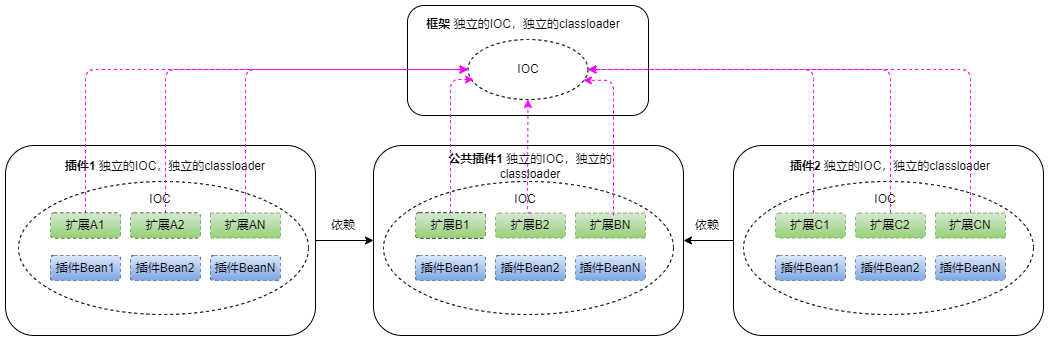
The framework and each plugin each have their own independent Spring IOC container and ClassLoader.
All extensions in the plugin will be registered to the framework's IOC container, but ordinary beans in the plugin will not be registered to the framework IOC container.
Interaction between plugins and between plugins and frameworks can be done through the FrameworkContextCapable interface (plugin, extension implementation both work) to get the framework's IOC container, and then through the framework IOC container to get any extension (regardless of which plugin defined it), or the framework's ordinary beans.
Note that when plugins and plugins have common APIs, to break the ClassLoader isolation problem between plugins, the common API can only be placed in the framework or shared dependency plugins. It is recommended to create a shared dependency plugin, and then all plugins that need to communicate depend on this plugin.
In the above figure, plugin 1 and plugin 2 both depend on common plugin 1; extension A1, extension A2, extension AN of plugin 1, extension B1, extension B2, extension BN of common plugin 1, extension C1, extension C2, extension CN of plugin 2 will all be registered to the framework's IOC container. Plugin 1 and plugin 2 can normally call extension B1, extension B2, extension BN of common plugin 1 through the framework's IOC; but plugin 1 cannot call extension C1 of plugin 2, because of class isolation issues, plugin 1 cannot parse extension C1.
For multi-plugin interdependency scenarios, refer to IGServer extension service sample programs multiple-common-api-plugin, multiple-demo1-plugin, multiple-demo2-plugin
Debugging in Development Mode
In development mode, the framework directly looks for class files compiled by Maven, not jar or zip packages.
In this mode, plugin metadata is defined by plugin.properties.
Debugging with IGServer Source Code
In monolithic mode, add JVM parameter -Dpf4j.mode=development to the mapgis-server module startup item to enable debug mode, and add JVM parameter -Dpf4j.pluginsDir=mapgis-igs-plugins to set the plugin directory.
Debugging without IGServer Source Code
If there is no IGServer source code, business units or external developers need to develop and debug plugins in plugin source projects, then need to disable keepalived mode (modify in igserver_for_java/bin/env.config), and add relevant startup parameters in igserver_for_java/bin/start-igs.bat.
SET "JAVA_OPTS=-Dfile.encoding=UTF-8 -DCONSOLE_CHARSET=GBK -DCONSOLE_WITH_JANSI=true -Dspring.output.ansi.enabled=ALWAYS -Dmapgis.home=.. -Digs.home=."
@REM Append the following line, note to modify the value of %plugins_dir%
SET "JAVA_OPTS=%JAVA_OPTS% -Dpf4j.mode=development -Dpf4j.pluginsDir=%plugins_dir% -agentlib:jdwp=transport=dt_socket,server=y,suspend=n,address=5005"
Note that the parameter -Dpf4j.pluginsDir= points to the developer's plugin directory structure, refer to pf4j official plugins demo
Plugin Dependencies in Development Mode
In debug mode, the plugin's ClassLoader by default only looks for the compiled target/classes folder. But the plugin also depends on other dependencies besides the framework (provided), so you need to use:
The plugin dependency is used to copy plugin dependencies to the generated target/lib folder:
<!-- If the plugin has local (non-framework provided) dependencies, such as project dependency plugin-common-lib, in debug state, you can only copy dependencies to target/lib through package to add to the plugin class loader -->
<plugin>
    <groupId>org.apache.maven.plugins</groupId>
        <artifactId>maven-dependency-plugin</artifactId>
    <executions>
        <execution>
            <id>copy</id>
            <phase>package</phase>
            <goals>
                <goal>copy-dependencies</goal>
            </goals>
            <configuration>
                <includeScope>runtime</includeScope>
                <outputDirectory>
                    ${project.build.directory}/lib
                </outputDirectory>
            </configuration>
        </execution>
    </executions>
</plugin>
Debugging in Runtime Mode
In runtime mode, place the packaged plugin in the igserver_for_java/plugins folder.
You need to disable keepalived mode (modify in igserver_for_java/bin/env.config), and add parameters in igserver_for_java/bin/start-igs.bat:
SET "JAVA_OPTS=-Dfile.encoding=UTF-8 -DCONSOLE_CHARSET=GBK -DCONSOLE_WITH_JANSI=true -Dspring.output.ansi.enabled=ALWAYS -Dmapgis.home=.. -Digs.home=."
@REM Append the following line
SET "JAVA_OPTS=%JAVA_OPTS% -agentlib:jdwp=transport=dt_socket,server=y,suspend=n,address=5005"
Plugin Sample Programs
See code at mapgis-igserver project:
mapgis-igs
  ├─── mapgis-igs-plugin                    # Plugin directory, the directory pointed to by the -Dpf4j.pluginsDir parameter
  │     ├──  demo-plugin                    # Monolithic sample plugin
  │     ├──  demo-whth-deps-plugin          # Monolithic sample plugin with local dependencies, dependency is demo-plugin-lib
  │     ├──  multiple-common-api-plugin     # Common plugin for multi-plugin sample
  │     ├──  multiple-demo1-plugin          # Plugin 1 for multi-plugin sample
  │     └──  multiple-demo2-plugin          # Plugin 2 for multi-plugin sample
  └── mapgis-igs-plugins-deps               # Plugin dependencies
        └──  demo-plugin-lib                # Dependency of demo-whth-deps-plugin
Issues
Package Sealing
https://docs.oracle.com/javase/tutorial/deployment/jar/sealman.html
When generating Jar files, we can specify whether to seal the entire Jar or some of its Packages. If the entire Jar file is sealed, it means all its Packages are sealed. Once a Package is sealed, after the Java Virtual Machine successfully loads a class from the sealed Package, all subsequent classes loaded with the same Package name must come from the same Jar file, otherwise a Sealing Violation security exception will be triggered.
Some third-party libraries, such as org.hsqldb:hsqldb, have configured sealed:true. Therefore, the situation where both the framework and plugin include this library cannot occur. This library already exists in the framework, so the plugin must manually exclude it.
SpringPlugin
When the plugin type is SpringPlugin, the Spring IOC in the plugin is supported by the framework. At this point, the plugin's ClassLoader cannot have pf4j-spring related (spring-context, spring-core) dependencies repeatedly, otherwise the IOC container in the plugin will report an error.