
System installation requirements
Hardware requirements
| Serial number | Category | Minimum configuration | Recommended configuration |
|---|---|---|---|
| 1 | Processor | Dual-core, 800 MHz clock speed | 16 cores, 2.00 GHz or above |
| 2 | Memory/RAM | 8GB | 16GB or above |
| 3 | Graphics card | 2GB of VRAM (Install the display adapter driver) | If you use 3D related features, it is recommended to configure a dedicated graphics card with 8GB or more of VRAM (Install the display adapter driver) |
| 4 | Hard disk | No less than 20GB of available space; if data storage is involved, it is recommended to add more. | No less than 80 GB of available space on an SSD; if data storage is involved, it is recommended to add more |
| 5 | Network adapter | Network adapter installed | Network adapter of 1000 M or above |
Software requirements
| id | Category | Architecture | Recommended configuration |
|---|---|---|---|
| 1 | Operating system | X86_64 | CentOS 7.6/7.8 |
| Ubuntu 20 | |||
| UOS V20 | |||
| Deepin V15 | |||
| Kylin V10 | |||
| NeoKylin V7.0 | |||
| nfschina(V3.1、V4.0) | |||
| AArch64(ARMv8) | UOS V20 | ||
| Deepin V15 | |||
| Kylin V10 | |||
| NeoKylin V7.0 | |||
| nfschina(V3.1、V4.0) | |||
| loongarch64 | UOS V20 | ||
| NeoKylin V7.0 | |||
| 2 | Browser | Firefox 5.0 and above | |
| Chrome 45.0 and above | |||
System port usage
During system operation, port usage is shown in the table below:
| Port number | Port description | Ports can be changed | Authentication methods | Encryption method | Note |
|---|---|---|---|---|---|
| 8089 | HTTP listening port and providing WebGIS services | Yes | Username & password | Passwords are stored using MD5 encryption | Externally |
| 30080~30099 | TCP listening port provides DCServer services | Yes | None | None | Not external; the number of ports fluctuates according to the number of processes configured by the user |
| 30280~30299 | TCP listens to ports and provides workflow services | Yes | None | None | Not external; the number of ports fluctuates according to the number of processes configured by the user |
| 30480~30499 | TCP listening port provides task processing services | Yes | None | None | Not external; the number of ports fluctuates according to the number of processes configured by the user |
| 52181 | HTTP listening port provides Zookeeper registration services | Yes | None | None | Not open to outsiders |
Tip:
All ports must not be occupied by other programs, and the "outbound" ports must have network restrictions relaxed; otherwise, other clients cannot access them normally.
System environment configuration
When installing and using MapGIS in a Linux environment, it relies on the Linux system infrastructure. For example, modifying hosts, viewing character sets, and installing third-party dependencies.
Configure hosts
Some machines will be very slow when starting the IGServer service or performing IGServer authorization. Efficiency can be accelerated by setting hosts.
1. View the hostname information and add the system's hostname and "127.0.0.1 www.smarnet.com.cn" to the hosts configuration file.
hostname
vim /etc/hosts
2. After adding the content, you can use the "cat /etc/hosts" command to check the information and confirm that the addition was successful.
cat /etc/hosts
Automatically installs third-party dependencies
Starting from MapGIS 10.7.6.10, the IGServer (JiuZhou) installation package added a support directory, which includes the bin script and thirdlibs tripartite dependencies. By using files in the support directory, third-party dependencies can be automatically checked and installed.
Currently supported systems include:
x86_64 architecture: CentOS 7 series (7.5-7.9), Ubuntu 20.04, Ubuntu 22.04, Kylin Server v10 SP2/SP3, UOS Server 20 1070A/1070E
aarch64 architecture:centos8、ubuntu20.04、ubuntu22.04、Kylin Server v10 SP2/SP3、uos server 20 1070a/1070e
The organizational structure of the folder is as follows:
 ├─ clib
 ├─ igserver_for_java
 ├─ license
 ├─ program
 ├─ sample
 ├─ slib
 ├─ slib
+├─ support
+│  ├─ bin
+│     ├─ check-libs.sh
+│     ├─ deps-install.sh
+│  ├─ thirdlibs
+│     ├─ deb
+│        ├─ ubuntu20.04-x86_64-deb
+│           ├─ ...
+│        ├─ ubuntu22.04-x86_64-deb
+│           ├─ ...
+│     ├─ rpm
+│        ├─ centos7-x86_64-yum-repo.tgz
 ├─ develop-license.sh
 ├─ entrypoint.sh
 ├─ startall.sh
 ├─ stopall.sh
1. Enter ".. /mapgis 10/support/bin" directory, run the following command to check:
cd /mapgis 10/support/bin
sudo ./check-libs.sh
2. If there is a missing dependency situation, the specific missing dependency information will be displayed:
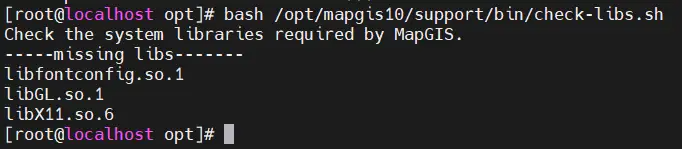
3. Automatic installation of missing dependencies can be performed using the following commands
sudo ./deps-install.sh install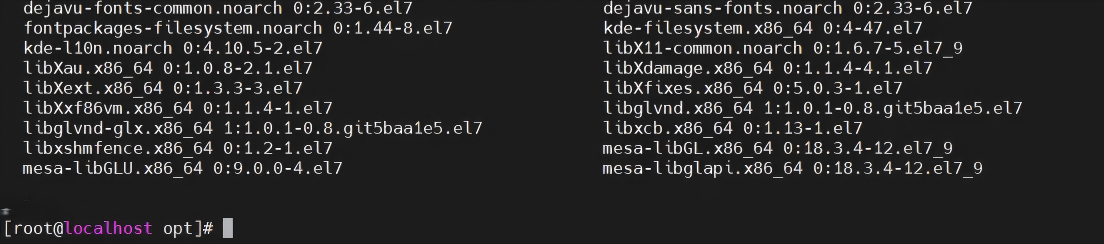
4. Check the dependencies again. If all dependencies are normal, the following information will be displayed:

Manually install third-party dependencies
For earlier versions of MapGIS or operating systems outside the specified scope, users can manually check and install third-party dependencies.
1. After extracting the MapGIS environment, go to the "/mapgis10/program" directory and add it to the environment variable LD_LIBRARY_PATH (/home/mapgis10/program is the MapGIS installation directory). After successful addition, you can display environment variable information via "echo $LD_LIBRARY_PATH", which already includes the mapgis installation path.
cd /home/mapgis10/program
export LD_LIBRARY_PATH=$(pwd):$LD_LIBRARY_PATH
echo $LD_LIBRARY_PATH
2. In the program environment, check whether the dependencies of the following four SO files are correct. After execution, you can list all dependencies for each SO, but do not display words like "not found" or "undefined."
ldd -r libmapgis_geomap.so
ldd -r libmapgis_geodatabase.so
ldd -r libmapgis_geoanalysis.so
ldd -r libmapgis_geoobjects.so
If there is a problem, missing dependency information will be displayed, as shown below: "libX11.so.6" is missing.

Tip:
1. The LD_LIBRARY_PATH set in step 2 is temporary; it is recommended to set LD_LIBRARY_PATH before executing LDD each time.
2. When directly using LDD to query dependencies, since all dependency information is listed, the information will be more numerous. It is recommended to use grep for filtering during execution, such as "ldd -r libmapgis_geomap.so |" grep undefined”。
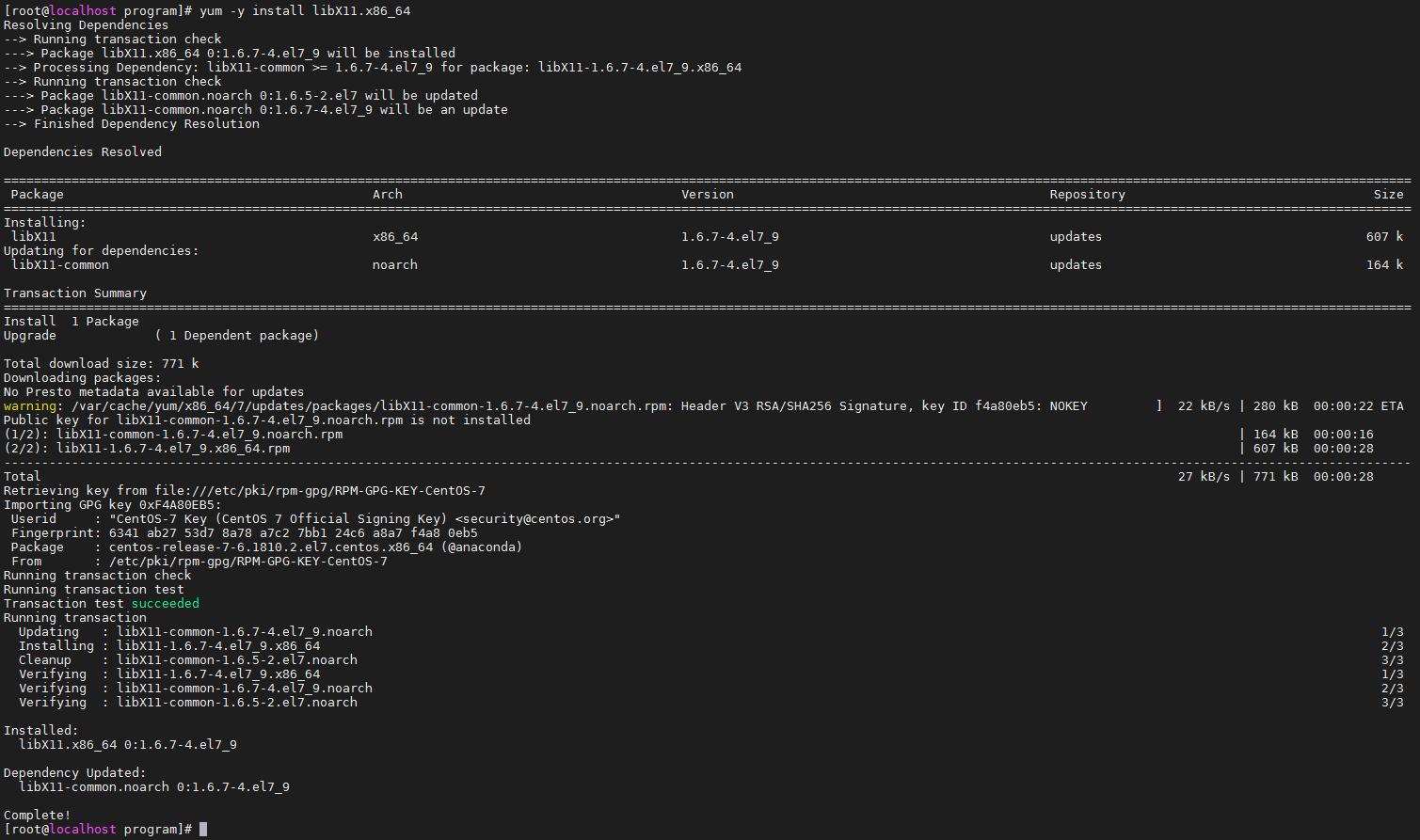
4. If dependencies are missing, you need to install relevant third-party software packages. You can first look up the specific names of dependencies before proceeding with installation.
yum list | grep libX11
yum -y install libX11.x86_64
Tip:
Third-party dependency installations can be done using apt-get or yum and other installation methods, but the approach is basically the same. Considering that third-party dependencies still have interdependencies, offline RPM package installation is not recommended; instead, it is recommended to install from the corresponding Linux operating system source.

4. After installation, repeat step 3 to ensure all third-party dependencies are correct.