CAS login configuration
 Function Description
CAS (Central Authentication Service) is an enterprise-grade, open-source Java project initiated by Yale University, designed to provide a reliable single sign-on solution for web application systems.
CAS Single Sign-On (SSO) is a unified authentication and authorization mechanism that means that the same user accessing protected resources in different applications on the same server only needs to log in once. That is, after passing the security verification in one application, they no longer need to log in and verify again when accessing protected resources in other applications.
Tips:
When logging in using CAS, the user defaults to the "Third-Party User Group," and their default associated role is "Guest." If a user wishes to expand their permissions when logging in using CAS, they can modify the associated role of the "Third-Party User Group" to expand their permission information.
 Operating Instructions
Before using CAS Single Sign-On, you need to install and configure the CAS authentication server. For relevant information, please refer to " CAS Single Sign-On ".
1. On the " Security " page, click " CAS Login Configuration " to configure CAS login information;
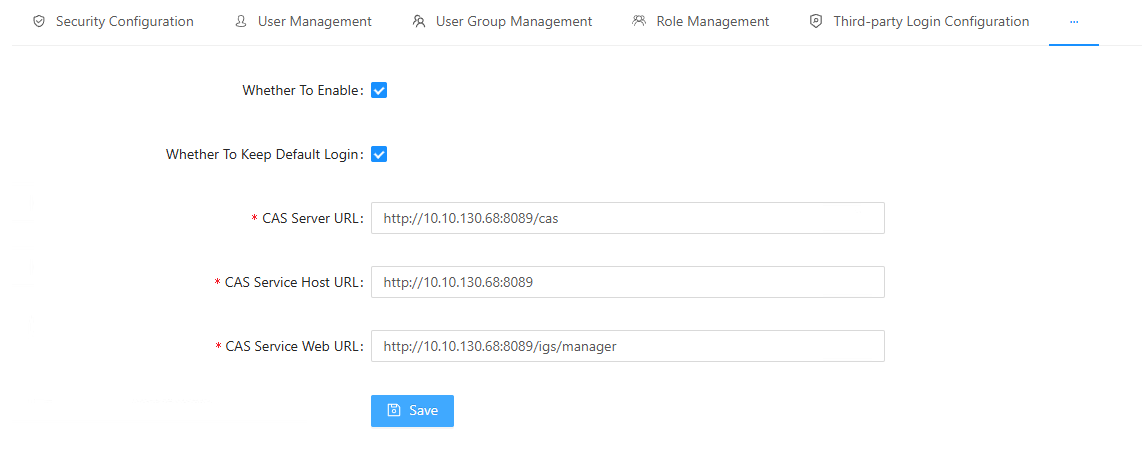
- [Enable or disable]: Check the box to enable CAS login;
- [Whether to retain the default login method]: When checked, the IGServer login page supports both the default and CAS login methods. If not checked, only the CAS login method is supported.
- [CAS Server Access Address]: Set the CAS server access address;
- [CAS Client Service Access Address]: The access address of the backend service, i.e., the base address of the web service;
- [CAS Client Web Access Address]: The entry point for the front-end web application.
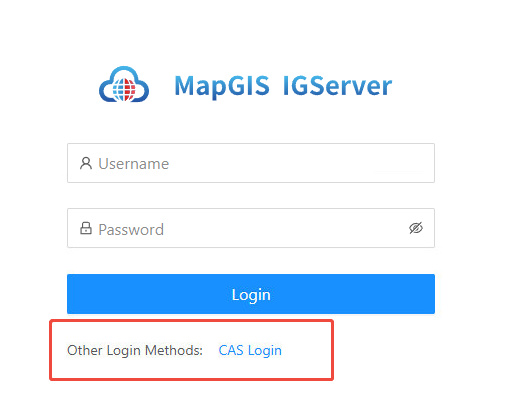
2. After enabling CAS login, you can log out of the logged-in user and go to the IGServer login page, where you will find that the CAS login method has been added.